


Executive Summary
- Jira release management works well for planning and tracking releases across teams. The problem usually starts later, when teams need to coordinate environments, deployments, and testing readiness across the release process.
- As releases become more complex, release managers often rely on spreadsheets, shared calendars, emails, or custom Jira workarounds to track which environments are available, which versions are deployed, and who is using them.
- That’s where environment planning becomes part of release management. Without clear visibility into environments and deployments, release execution becomes difficult to coordinate, even when the release itself looks well-organized in Jira.
- This guide explains where native Jira release management works well, where it starts to struggle during release execution, and how teams can centralize environment management directly inside Jira.
Jira’s Test Environment Gap
If you work in Jira release management, chances are you’re planning releases in Jira and managing software environments outside of it.
This is pretty normal.
It’s because, out of the box, Jira is really good at tracking releases, i.e., telling you what’s in a release and if it’s ready. What it isn’t good at is tracking and controlling the environments your teams use during software delivery, i.e., development, testing, pre-production/staging.
But software environment management, often referred to as test environment management (TEM), is part of a release manager’s job. So, when you get asked questions about your production and test environments, you’re probably using spreadsheets or shared calendars or long email chains (or any combination thereof) to answer them.
No one these days is going to argue that spreadsheets and email are great facilitators of collaboration or efficiency. But you keep using them because native Jira doesn’t offer an option.
So let’s look at how you can plug the environment gap in your release management, so your release execution can finally live where the rest of your delivery already does: Jira.
Release Management vs Environment Management vs Deployment Management
First, let’s clear up some definitions.
Release management, environment management, and deployment management are all different but closely related disciplines.
What is Release Management?
Release management is about what goes out and when. It is the entire end-to-end process of delivering new software to users, from feature/fix request through to deployment. Therefore, release management includes environment management and deployment management and should be considered the umbrella discipline.
Jira release management is typically handled through work items, versions, boards, reports, and the Jira release hub.
What is Environment Management?
Environment management is about where you deploy and in what condition. It’s about tracking and scheduling the different environments teams use for development, testing, staging, and production. It tells teams things like: which version is deployed in an environment, who deployed it, and whether an environment is available.
You can do a bit of basic environment tracking in Jira using the Environments field, and by creating objects to represent your environments using Assets. However, you’ll quickly run into limitations, which is why release managers tend to resort to spreadsheets and documentation.
What is Deployment Management?
Deployment management is about how the software is moved between the different software environments. It is the process of physically placing the release into those environments and making sure the new software functions, performs, and integrates as intended. It’s usually handled by CI/CD (continuous integration and continuous delivery) tools like Jenkins, GitLab, or Bitbucket Pipelines.
You can do deployment tracking in Jira by integrating your CI/CD tools and tracking the progress of work items as they move through your deployment pipeline.
It could help to think of environments, deployments, and releases like this:
- Environments = airports
- Deployments = flights
- Releases = flight plans
Comparing Release Management, Environment Management, and Deployment Management
Criteria | Release Management | Environment Management | Deployment Management |
|---|---|---|---|
Main focus | Coordinating the overall release process and delivery readiness | Managing the availability, state, and usage of environments | Moving software changes between environments |
Main question answered | “What is being released and when?” | “Where is it deployed and is the environment ready?” | “How is the software deployed?” |
Typical responsibilities | Planning releases, tracking scope, approvals, timelines, and readiness | Tracking environments, scheduling usage, managing reservations and dependencies | Executing deployments, rollbacks, and release delivery workflows |
Common activities | Managing versions, coordinating teams, release reporting, governance | Booking environments, checking availability, monitoring deployed versions | Running pipelines, deploying builds, validating deployments |
Typical environments involved | Development, testing, staging, production | Development, testing, UAT, PRE-PROD, staging, production | Development, testing, staging, production |
Jira native capabilities | Strong support through versions, boards, reports, release hub, and timelines | Limited support through Assets and custom workarounds | Basic deployment tracking through CI/CD integrations |
Common tools | Jira, Jira Plans, release dashboards | Golive, Assets, spreadsheets, shared calendars | Jenkins, GitLab CI/CD, Bamboo, Bitbucket Pipelines |
Main visibility need | Release scope, progress, approvals, timelines | Environment availability, reservations, deployed versions, dependencies | Deployment status, deployment history, pipeline execution |
Main operational risk | Releasing unfinished or unapproved work | Environment conflicts, unavailable test environments, wrong versions deployed | Failed deployments, rollback issues, broken pipelines |
Typical manual workaround | Confluence release documentation | Spreadsheets, Outlook calendars, emails | Manual deployment logs and deployment notes |
Scaling challenges | Coordinating cross-team releases and dependencies | Managing multiple teams, bookings, and environment conflicts | Managing deployment consistency across environments |
Relationship to the release process | Umbrella discipline covering planning through delivery | Part of release execution and release readiness | Part of release execution and software delivery |
Example question | “Is this release ready to go live?” | “Who is using UAT right now?” | “Was this version deployed successfully to PRE-PROD?” |
Common Environment Questions a Release Manager Has to Answer
Effective release management can’t happen without good test environment management, which is why the latter often falls to the release manager. Although environment management is a different discipline, it’s part of the execution layer of release management, and software releases live and die by environment readiness.
So you can have a perfectly planned release in Jira, with your scope defined, approvals in place, and tickets ready to go. But if the user acceptance testing (UAT) environment isn’t available, or the pre-production (PRE-PROD) environment doesn’t have the correct version running, the release is stuck.
That’s why in reality a big part of a release manager’s job is operational coordination, i.e., making sure the right environments are available at the right time, in the right state, for the right teams. As part of that, they need to answer questions like:
- “What is the version deployed on TEST?”
- “Who is using UAT right now?”
- “Where can I test this fix?”
- “Why is this test failing in PRE-PROD?”
As a release manager, if you can’t answer these questions quickly and correctly, problems ensue. For example, a developer could change the configuration in pre-prod while a salesperson is giving a demo to a business, causing the demo to crash. Or a team could end up testing the wrong version for a week, leading the company to have to postpone the go-live to customers.
In practice, release managers need continuous visibility into:
- Which environments exist
- What version is currently deployed in each one
- Who deployed the version and when
- Whether an environment is available, reserved, or broken
Going back to the air traffic analogy, you can have a perfect flight plan and the best planes in the world, but without air traffic control managing the airports, you get chaos.
Jira’s Release Management Features
Jira is a strong tool for managing complex release cycles. The following features are at your disposal for Jira release management:
Jira Versions and Version Fields
Jira uses software versions to schedule and organize your releases. Each Jira version can have a name, description, start and release date, and a status: released, unreleased, or archived.
You can use the Affects version field to specify the version where a bug or problem has been found, and the Fix version field to identify the version that will contain the bugfix or new feature.
You can also use versions to filter information in various reports. Jira reports and views
Jira Release Hub
The Jira release hub is a special dashboard that shows a summary of progress on multiple Jira versions across different Jira spaces (formerly called ‘projects’), and a breakdown of all the work items in each version.
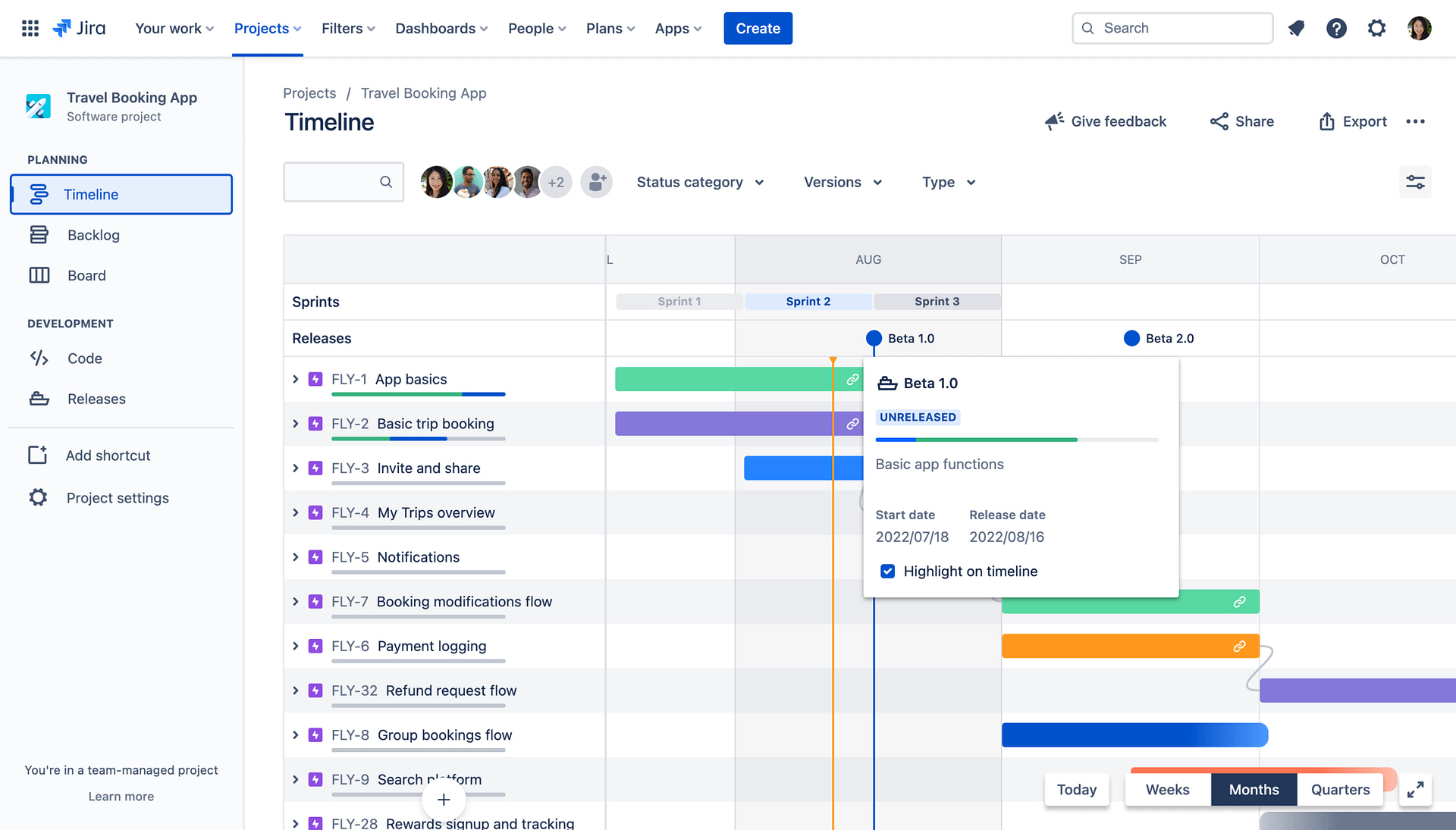
There are a number of built-in reports to help make data-driven decisions about releases, such as the release burndown and version report. You can monitor releases in real time using the Jira timeline view (below). Your Jira Kanban board can be used to visualize the workflow and spot bottlenecks. And if you have a premium subscription, you can use Jira Plans (formerly called Advanced Roadmaps) for visualizing more complex cross-space releases and mapping dependencies.
Jira Deployment Tracking
Finally, Jira release management offers deployment tracking when you integrate your Jira with your CI/CD tool. Once the integration is set up, a new “Releases” section appears in your Jira work items, allowing you to see which environments your ticket has been deployed to.
Where Native Jira Release Management Struggles: Release Execution
Jira’s release management capabilities are strong, but they only go so far. They don’t fully cover the release execution phase: actually delivering the software.
For example, a notable deployment tracking limitation with out-of-the-box Jira is the inability to link Jira versions to deployments. It means you only have visibility of which tickets have been deployed, not which versions, and you don’t get the whole picture in terms of release integrity and what is actually running in each test environment.
However, Jira’s main release management limitation is its lack of test environment management capabilities.
As alluded to earlier, you can co-opt Assets as a test environment inventory and create Assets objects for each environment. But this is a workaround. Assets is a database for IT inventory, not a TEM system. There are no scheduling or booking capabilities, no environment usage calendars or timelines for past and future usage, and no deployment event model to track what was deployed and when.
You can build scheduling capabilities into Jira by using Jira work items as booking requests and adding custom logic to make it run as a booking system. This includes creating appropriate custom fields and automation rules for conflict detection and requesting approval. You can then use this in conjunction with an Assets-based environment inventory.
But even using Assets and Jira-ticket-based booking together is clunky. You have no visibility of timelines, deployments, or dependencies between environments, and the Jira automations you use to flag overlapping reservations and block bookings are brittle and hard to maintain. They’re even harder to keep on top of as the number of environments, teams, and cross-project bookings grows.
So, release managers compensate with other methods and tools.
Spreadsheets, Shared Calendars, and Manual Documentation
Since Jira doesn’t give you a shared, live, environment-centric view, lots of release managers will instead create a spreadsheet, shared calendars, or bits of documentation to track and schedule environments.
The Good, Bad, and Ugly About Spreadsheets for TEM
Spreadsheets allow you to document environment names, statuses, configurations, and availability. Some release managers will even use them to coordinate releases and manage deployment timelines. They do this by creating tabs and custom columns for different environments and manually inputting changes as they happen.
There’s usually someone on all teams who thinks the solution to any problem is a well-designed spreadsheet in Excel, Google Sheets, or SharePoint. But although spreadsheets can work well in planning small releases involving only a few environments, their weaknesses become evident as soon as an operation gets a bit more complicated.
This is because spreadsheets are static. Changes and updates are manual and time-consuming because there’s no automation or integration with CI/CD tools or Jira. The structure of a spreadsheet is so fragile that it’s easy to break all the data. Spreadsheets can’t enforce any rules or responsibilities because anyone can type anything, which can lead to scheduling conflicts and stale reservations. And there’s no real audit trail or accountability because of weak version history and the lack of any usage calendars and timelines.
Returning to the air traffic analogy, spreadsheets are like using a notebook as an air traffic control system.
The Good, Bad, and Ugly about shared Calendars for TEM
Using Outlook or Google shared calendars is an obvious go-to for release managers scheduling test environments.
They’re easy to use and excellent for basic scheduling tasks. However, they fall short when managing a release. Calendars model time slots, not environment states. Like spreadsheets, they can’t enforce rules and don’t offer automation or real-time environment updates because they don’t integrate with Jira or CI/CD pipelines. They lack audit trails and visibility of dependencies and last-minute changes, and basically have no connection to what’s actually happening.
The Good, Bad, and Ugly About Using Emails and Documentation Tools for TEM
Emails are a common way to communicate release plans, but they’re really bad for managing test environments.
For one, they’re slow, which doesn’t work when environments are changing minute by minute. They don’t offer a source of truth because information gets buried in long threads, and not everyone gets cc’ed on everything, which means different people have different contexts. There’s no real-time visibility of the environment state or availability, no automation or integration, and no control.
Using shared, live documentation like Confluence is better than using emails. But not much better. A Confluence page describes what should be happening, not what is happening. Like the other methods we’ve just talked about, it can’t enforce processes or rules and has no concept of an environment’s live state. In this case, you’re literally using a notebook as an air traffic control system.
Dedicated Test Environment Tools
The limitations of spreadsheets, shared calendars, and documentation tools could tempt you to turn to a dedicated TEM tool like Enov8 or Plutora.
These are brilliant tools for release and environment management. But they’re major, completely new platforms you’d need to purchase, install, configure, and integrate with your Jira. Integrating them with Jira can be complex and time-consuming, and may lead to compatibility issues and data inconsistencies. And they come with a completely different user interface, which means investing time and resources to train your team on how to use it.
The other problem with tools like Enov8 or Plutora is that they overlap with a lot of the release management capabilities already available in Jira.
If you’re doing release management in Jira, then to avoid overkill, complexity, and lengthy procurement and onboarding, you’re better off with a Jira app.
Comparing Jira Native Capabilities vs Apwide Golive for Environment Management
Capability | Native Jira + Assets | Golive |
|---|---|---|
Environment inventory | Possible using Assets objects and custom configuration | Purpose-built environment inventory for TEM |
Environment scheduling | Requires Jira tickets, custom fields, and automation rules | Native environment scheduling inside Jira |
Booking conflict prevention | Requires custom Jira automation | Built-in conflict prevention |
Timeline visibility | No native environment timeline view | Visual booking timeline with drag-and-drop scheduling |
Deployment visibility | Tracks deployments through CI/CD integrations | Tracks both CI/CD integrations and manual deployments |
Jira version visibility | Deployments are linked to Jira work items only | Deployments are linked to both Jira work items and Jira versions |
Environment dependencies | Tracks dependencies by linking Assets objects | Tracks dependencies between environments |
Real-time environment visibility | Limited | Visibility into deployed versions, status, ownership, and history |
Automation complexity | Requires custom logic and maintenance | Built-in workflows and automation |
CI/CD integration | Deployment tracking supported | Native integrations with deployment tools like Jenkins, GitLab, GitHub, Azure DevOps, etc. |
Self-service capabilities | Limited | Self-service environment booking and deployment actions |
Scalability | Becomes difficult to maintain as complexity grows | Designed for multi-team environment coordination inside Jira, with granular permissions |
Golive: Adding a Missing Layer to Jira
Jira already gives release managers strong visibility into planning, scope, progress, and governance. The challenge usually starts during release execution, when teams need to coordinate environments, deployments, bookings, and testing readiness across multiple systems and teams.
That’s the gap Golive was designed to fill.
Instead of managing environment coordination through spreadsheets, shared calendars, custom Jira automations, or external TEM platforms, Golive adds a dedicated test environment management layer directly inside Jira. This allows release planning, environment coordination, deployment visibility, and execution readiness to happen in the same place.
Here are some of the features it uses to do this.
How Golive handles environment inventory
One of the biggest challenges in release execution is simply knowing what is deployed where. Native Jira can track releases, but environment visibility often ends up scattered across spreadsheets, documentation, or custom Assets configurations.
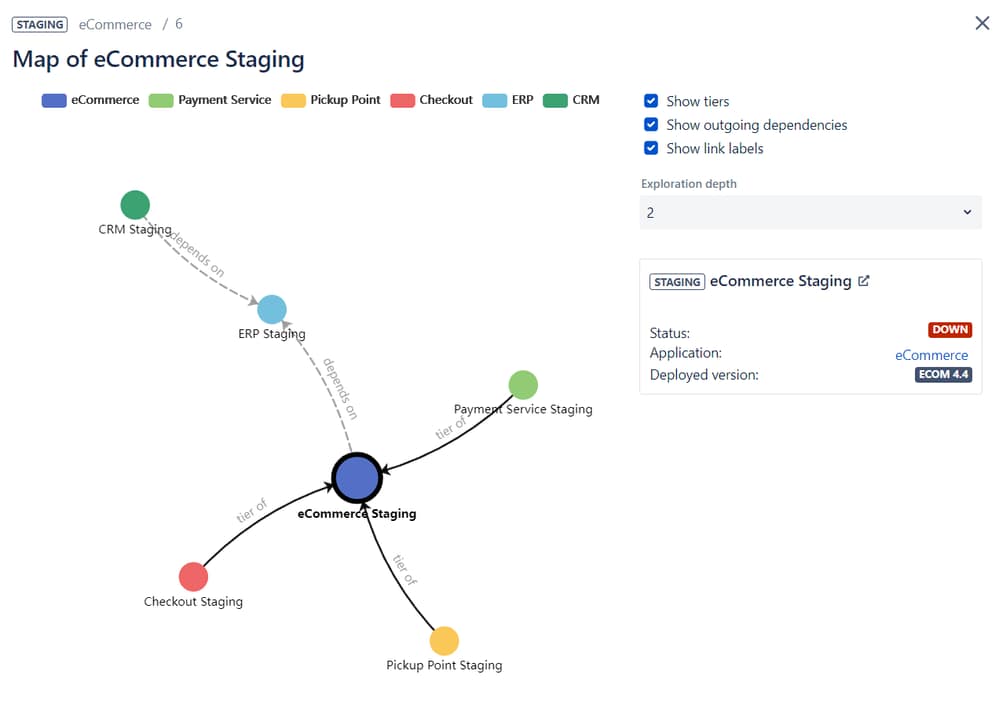
Golive brings that visibility directly into Jira by treating environments as first-class objects built specifically for test environment management. Each environment includes information such as status, owner, deployed version, and deployment history, giving teams a clearer operational view of what is happening across development, testing, staging, and production environments.
Teams can also track dependencies between environments and monitor KPIs like environment availability over time.
How Golive supports environment scheduling
Scheduling environments becomes difficult very quickly once multiple teams, deployments, and testing activities start happening in parallel. This is where many release managers fall back on spreadsheets, shared calendars, or complex Jira automations.
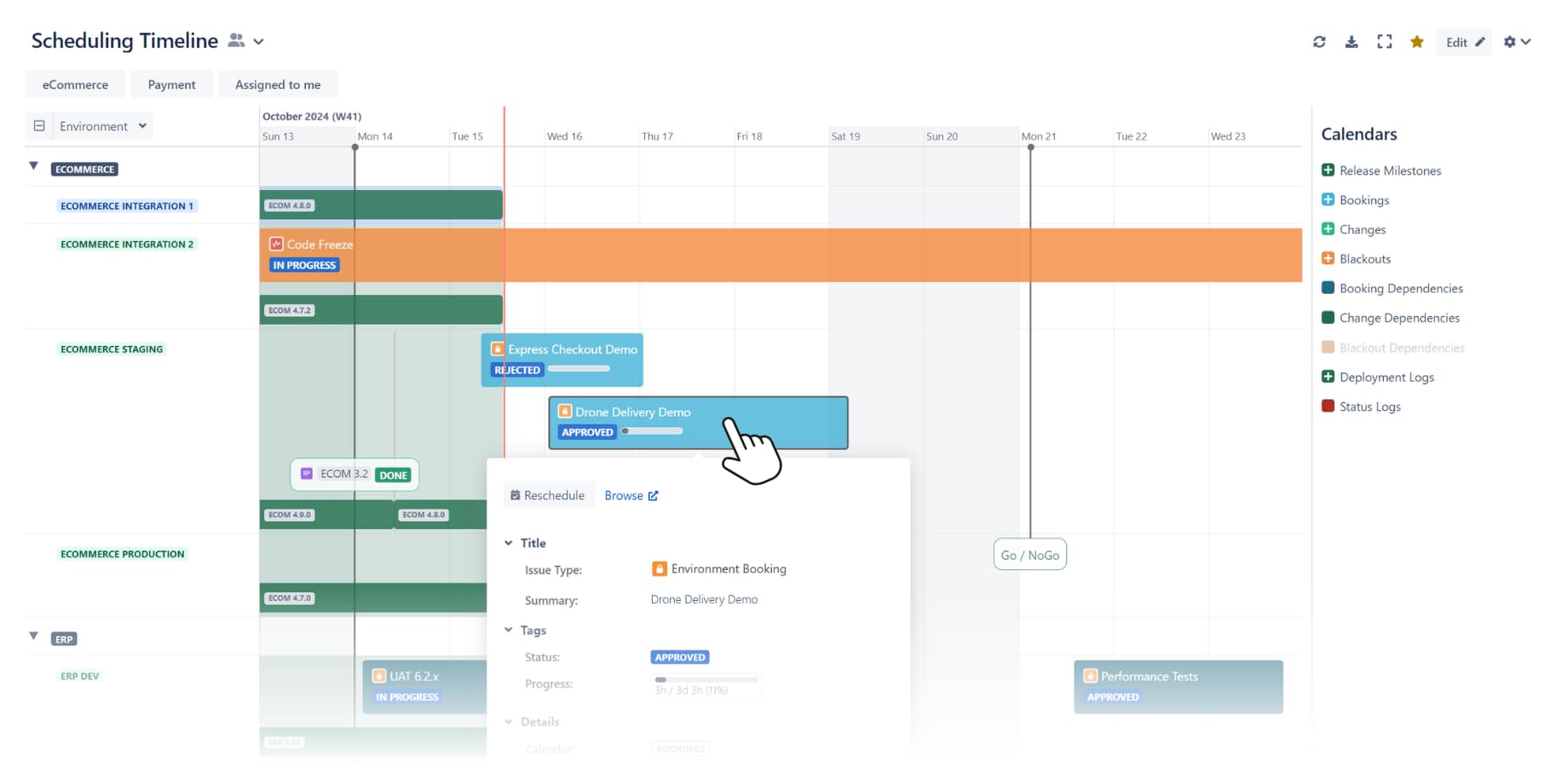
Golive adds scheduling capabilities directly inside Jira with real-time visibility into environment availability, deployments, and dependencies. Instead of building custom booking workflows, teams can manage reservations through an Environment custom field connected to the Golive inventory.
The platform also includes built-in conflict prevention, automated approvals, and dependencies auto-booking. A visual booking timeline helps teams quickly identify scheduling conflicts, check upcoming reservations, and reschedule activities with drag-and-drop interactions.
How Golive improves Jira deployment tracking
Out of the box, Jira deployment tracking focuses mainly on CI/CD deployments and ticket visibility. That works well for basic tracking, but it leaves gaps when release managers need a clearer picture of release integrity and environment state.
Golive extends deployment tracking by recording additional deployment events such as manual deployments, rollbacks, emergency changes, legacy system updates, and vendor releases. It also links Jira versions directly to deployments, helping teams understand not only which tickets were deployed, but also which versions are currently running in each environment.
This gives release managers better visibility into deployments across the entire release process.
How Golive enables self-service environment management
A lot of release coordination still depends on release managers manually handling bookings, deployment requests, and environment preparation. As delivery scales increase, that quickly becomes difficult to sustain.
Golive reduces part of that operational overhead with self-service capabilities built directly into Jira. When users create a booking request, the platform immediately checks for conflicts, exclusivity rules, and blackout periods before the request moves forward.
Once approved, Golive can automatically trigger preparation actions such as resetting environments, deploying specific versions, or refreshing test data through CI/CD integrations. Combined with Jira Automation, teams can even deploy versions to environments without needing direct access to deployment tools.
With Golive, Jira Manages the Plan and the Reality
Golive closes the gap between release planning and deployment execution in Jira.
Without Golive, Jira is good for managing scope, progress, and governance in releases, but environment and deployment management are probably better done elsewhere.
With Golive, Jira is good for all of your release management. From environments and deployments to scheduling and execution readiness, end-to-end software delivery can be done without leaving Jira.
So, if your Jira release management still depends on master spreadsheets, a UAT calendar, or a Confluence page of “current versions”, it’s a sign that your organisation is outgrowing manual, decentralized environment processes. Exactly the problem Golive was designed to solve.
Centralize your Jira release management tasks and try Golive free for one month.
Key Takeaways
- Release planning and release execution are different operational challenges.
- Native Jira supports release tracking well, but environment coordination often happens outside Jira.
- Spreadsheets and shared calendars can work for small operations, but become difficult to maintain as release complexity grows.
- Jira Assets can support basic environment inventory management, but not full test environment management workflows.
- Environment visibility becomes critical once multiple teams, deployments, and test environments need to be coordinated simultaneously.
- Golive extends Jira with environment scheduling, deployment visibility, and environment management capabilities built for release execution.
FAQ
Jira offers limited environment management capabilities out of the box. Teams often rely on Assets, custom workflows, spreadsheets, or external tools to manage environment scheduling, visibility, and coordination.
Test environment management is the process of tracking, scheduling, and coordinating the environments used for development, testing, staging, and production during software delivery.
Assets can be used as an environment inventory, but it does not provide native scheduling, booking timelines, deployment visibility, or environment dependency tracking.
Native Jira deployment tracking shows which tickets were deployed, but it does not link Jira versions directly to deployments or provide full visibility into environment state and release integrity.
Many teams use spreadsheets because Jira does not provide a shared environment-centric view out of the box. However, spreadsheets become difficult to maintain as release coordination grows more complex.
Golive adds test environment management capabilities directly inside Jira, including environment inventory, scheduling, deployment visibility, dependency tracking, and self-service workflows.
