


Executive Summary
- HETSL, a Swiss university, eliminated half its help desk no-shows by replacing a disconnected scheduling tool with the Apwide Booking in Jira Service Management.
- Challenge: Appointment reminders reached students through a university channel they rarely checked, driving persistent no-shows during peak academic periods.
- Solution: Migrated to a JSM-native booking workflow that reaches students on their personal email, with an automated same-day reminder.
- Result: 50% reduction in no-shows and greater help desk capacity when demand is highest.
- Outlook: Expanding the platform to equipment lending, applying the same automation-first model to a new class of resources.
University help desks live and die by attendance. A support team can offer the cleanest booking experience in the world, but if the person who reserved a slot never shows up, the appointment is wasted, the agent's time is gone, and the queue gets longer for everyone else. For a help desk serving thousands of students and staff, those empty slots add up fast.
This was the situation faced by HETSL, a Swiss university of applied sciences located in Lausanne. Its help desk handles support meeting bookings for two very different audiences: staff collaborators, who work inside the university's tools every day, and students, who do not.
A Service Shaped by the Academic Calendar
HETSL's help desk fields several support bookings per week, but demand is far from flat. It rises and falls with the rhythm of the academic year, with recurring peaks the team can set their watch by: the start of the academic year in September, end-of-semester exams in December, bachelor evaluations in February, and end-of-year exams in June.
During those peaks, every no-show matters more. A missed appointment in a quiet week is an inconvenience. A missed appointment during exams, when the team is already stretched, is a real operational cost.
The Problem Wasn't the Booking — It Was the Reminder
For a long time, the help desk relied on Microsoft Bookings, the Outlook-based scheduling tool that lets staff publish their availability for others to reserve. With no native connection to Atlassian, the team had built a background workaround to create a Jira ticket for each booking. It worked, but it was plumbing to maintain rather than a real support-desk workflow. And it left help desk appointments as the odd one out, handled in a separate tool, while every other request already lived in Jira Service Management.
The deeper issue had nothing to do with the integration. Microsoft Bookings sends its invitations through the Microsoft 365 ecosystem, so they only land cleanly for people who use Outlook. Staff did; students rarely opened their university accounts, so the invitation vanished into an unread inbox and the appointment slipped their mind.
The root cause was a mismatch: the tool assumed everyone was an Outlook user, while much of the audience lived on personal email. Fixing the no-shows wasn't about better scheduling, but about reaching people on a channel they actually checked.
Switching to Apwide Booking in Jira Service Management
In mid-2025, HETSL moved its help desk bookings to Apwide Booking, natively integrated with Jira Service Management. The new workflow was designed and implemented by Swarmit, a Swiss Atlassian Platinum Partner, working closely with Luca Giannantonio, IT Technician at HETSL and the project's main stakeholder.
The custom workaround was no longer needed: bookings now flow into Jira as structured requests by design, not through a script holding two disconnected systems together. Help desk appointments stopped being a special case and joined every other request in the same JSM portal. One place for the team to manage, one place for users to ask.
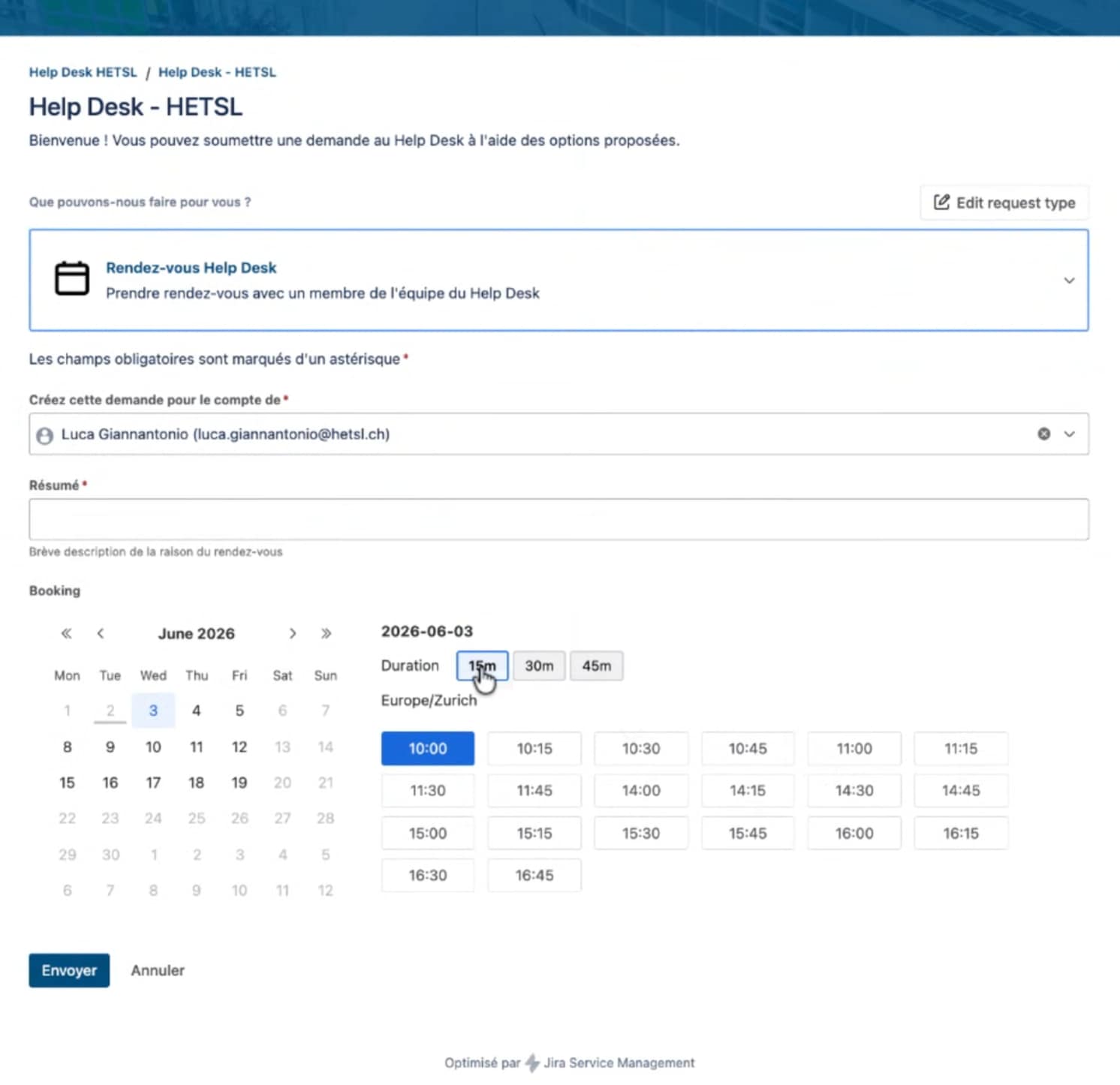
Help Desk JSM Request for appointment bookings
The team also tuned the booking experience to match how the help desk actually works. Requesters choose a slot length that fits their need — 15, 30, or 45 minutes, depending on the type of question and the help required — so a quick fix no longer takes the same block as an in-depth issue. Bookings are also limited to a rolling three-week window, which keeps the calendar realistic and stops appointments from being parked far in advance.
More importantly, the switch gave the team control over the communication channel that had been failing them:
- Students book with a personal email address. Instead of routing everything through the university account, the booking captures the personal email address students actually use.
- A reminder goes out at 7:00 AM on the day of the appointment, sent to that personal email via Jira Automation, so it arrives in the student's inbox before the day even starts.
- No-shows dropped by 50%.
That last number is the headline outcome, and it came directly from closing the gap between where the reminder was sent and where the student was actually looking.
"The old reminders went to an email students never checked. Now they land on the address they actually use, and our no-shows dropped by half!"
— Luca Giannantonio, IT Technician, HETSL
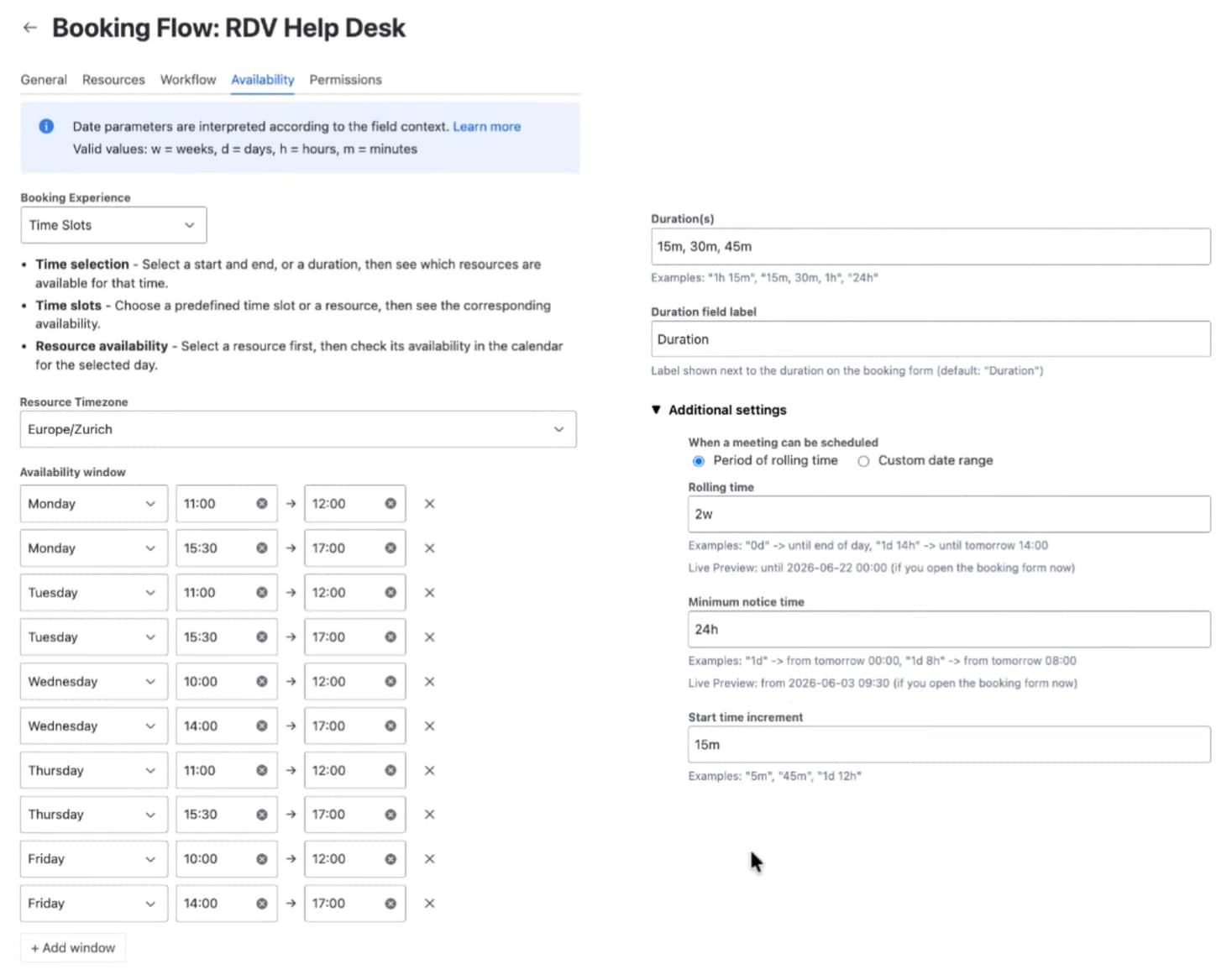
Booking Flow Availability Configuration
The Impact on the Help Desk
For the support team, the change is felt most during the busy stretches of the academic year. Slots that would once have gone empty are now used. Agents spend less time waiting on people who never arrive, and the help desk gets more out of the same capacity precisely when demand is highest.
For students, the experience is simpler and more forgiving: they book with the email they already check, and a well-timed morning reminder makes sure the appointment doesn't slip past them.
And for the team, the lesson generalized nicely. When an automated reminder reliably reaches people, attendance takes care of itself.
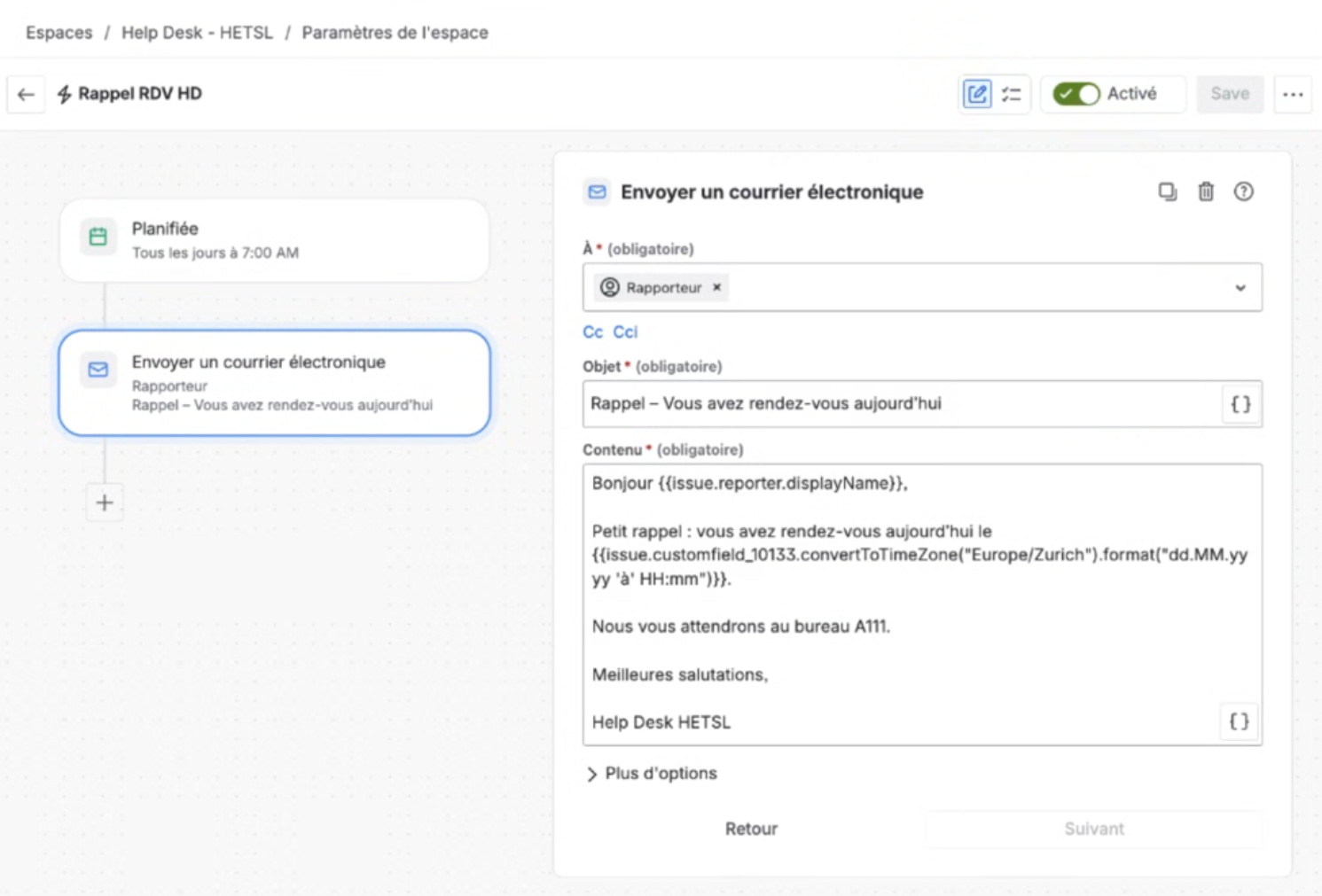
Jira Automation for Appointment Reminders
What's Next: From Appointments to Equipment Lending
HETSL is now extending the same approach beyond support meetings. The team is organizing its asset inventory in Jira Assets and preparing to use Apwide Booking for equipment lending, letting students and staff reserve physical gear — projectors, cameras, tripods, microphones, and similar audiovisual equipment — directly through Jira Service Management.
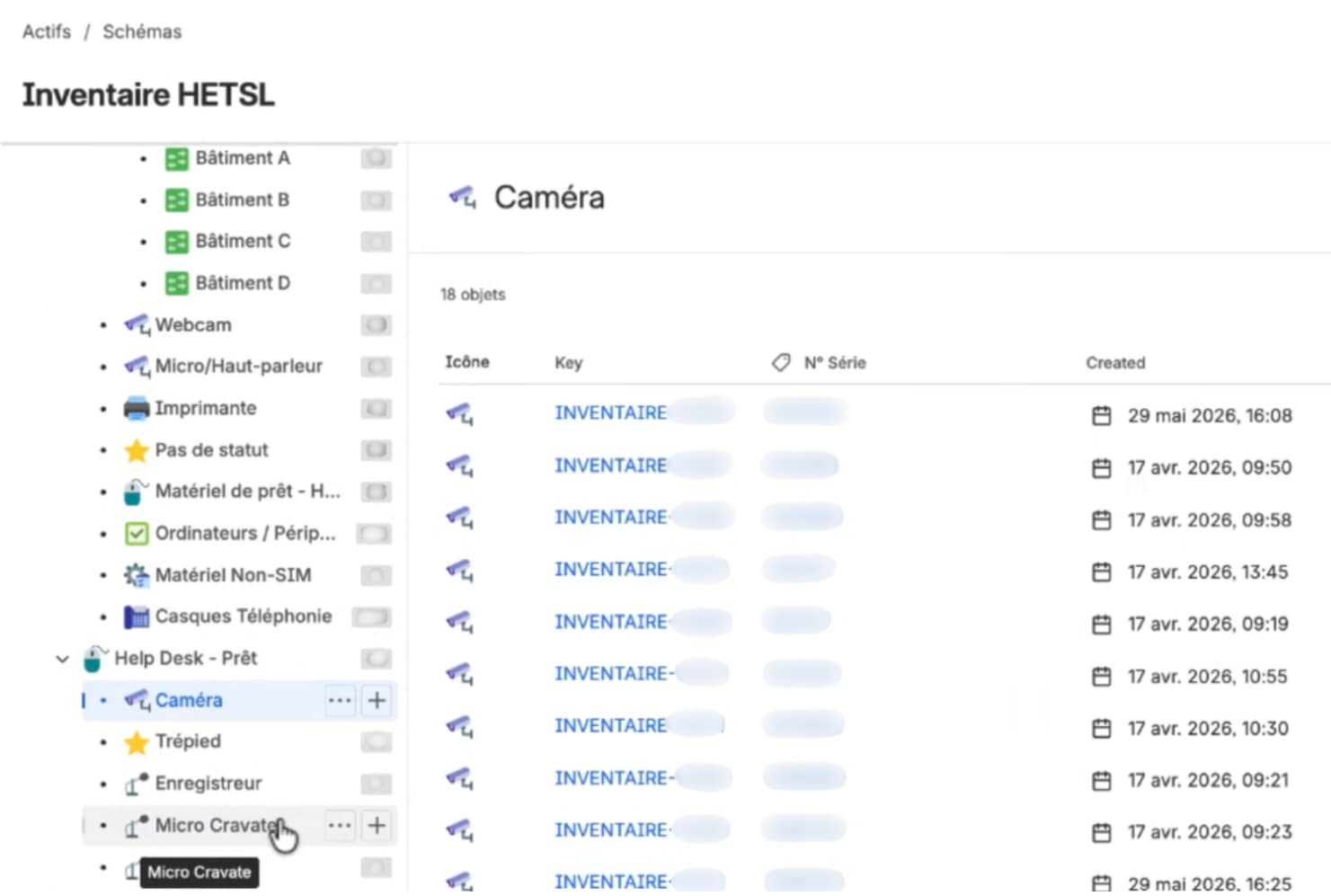
HETSL Equipment Stored in Jira Assets
The plan is to use Apwide Booking's maximum-duration setting to match the lending period of each type of equipment, combined with HETSL's own Jira workflow and Jira Automation to handle return reminders. It's the same automation-first playbook that solved the no-show problem, applied to a new kind of resource.
The booking was never the hard part. Getting people to show up was — and now, they do.
Implementation by Swarmit, a Swiss Atlassian Platinum Partner, in close collaboration with Luca Giannantonio, IT Technician at HETSL.
Key Takeaways
- Fix the channel, not the calendar. No-shows halve once reminders reach the email students actually read.
- Match the tool to your real users. Outlook invites failed because students lived on personal email.
- One portal beats a patchwork. Native JSM integration brought appointments in line with every other request.
- Small settings matter. Flexible 15/30/45-minute slots and a three-week window keep the calendar realistic.
- Good patterns scale. The same automation-first approach is now extending to equipment lending.