


Summary
- Jira release management is a great tool for some of the processes, specifically release planning and governance. But it falls short when it comes to release execution.
- Jira offers some deployment tracking capabilities out of the box, but it is completely missing any test environment management (TEM) features.
- Certain Jira features can be co-opted for environment management, such as using Jira tickets for booking requests and Assets to make an environment inventory. But you’ll soon run into limitations, especially when scaling up.
- Release managers often rely on spreadsheets, shared calendars, and manual documentation, such as emails and Confluence pages, to track and schedule environments. None of these is very efficient or scalable.
- Another option is a dedicated test environment management tool like Enov8, but it overlaps significantly with Jira’s release management capabilities.
- To avoid overkill and complexity, you’re better off with a Jira app like Golive, which allows the entire release management process to happen in Jira.
Jira’s Test Environment Gap
If you work in Jira release management, chances are you’re planning releases in Jira and managing software environments outside of it.
This is pretty normal.
It’s because, out of the box, Jira is really good at tracking releases, i.e., telling you what’s in a release and if it’s ready. What it isn’t good at is tracking and controlling the environments your teams use during software delivery, i.e., development, testing, pre-production/staging.
But software environment management, often referred to as test environment management (TEM), is part of a release manager’s job. So, when you get asked questions about your production and test environments, you’re probably using spreadsheets or shared calendars or long email chains (or any combination thereof) to answer them.
No one these days is going to argue that spreadsheets and email are great facilitators of collaboration or efficiency. But you keep using them because native Jira doesn’t offer an option.
So let’s look at how you can plug the environment gap in your release management, so your release execution can finally live where the rest of your delivery already does: Jira.
Release Management vs Environment Management vs Deployment Management
First, let’s clear up some definitions.
Release management, environment management, and deployment management are all different but closely related disciplines.
What is Release Management?
Release management is about what goes out and when. It is the entire end-to-end process of delivering new software to users, from feature/fix request through to deployment. Therefore, release management includes environment management and deployment management and should be considered the umbrella discipline.
Jira release management is typically handled through work items, versions, boards, reports, and the Jira release hub.
What is Environment Management?
Environment management is about where you deploy and in what condition. It’s about tracking and scheduling the different environments teams use for development, testing, staging, and production. It tells teams things like: which version is deployed in an environment, who deployed it, and whether an environment is available.
You can do a bit of basic environment tracking in Jira using the Environments field, and by creating objects to represent your environments using Assets. However, you’ll quickly run into limitations, which is why release managers tend to resort to spreadsheets and documentation.
What is Deployment Management?
Deployment management is about how the software is moved between the different software environments. It is the process of physically placing the release into those environments and making sure the new software functions, performs, and integrates as intended. It’s usually handled by CI/CD (continuous integration and continuous delivery) tools like Jenkins, GitLab, or Bitbucket Pipelines.
You can do deployment tracking in Jira by integrating your CI/CD tools and tracking the progress of work items as they move through your deployment pipeline.
It could help to think of environments, deployments, and releases like this:
- Environments = airports
- Deployments = flights
- Releases = flight plans
Common Environment Questions a Release Manager Has to Answer
Effective release management can’t happen without good test environment management, which is why the latter often falls to the release manager. Although environment management is a different discipline, it’s part of the execution layer of release management, and software releases live and die by environment readiness.
So you can have a perfectly planned release in Jira, with your scope defined, approvals in place, and tickets ready to go. But if the user acceptance testing (UAT) environment isn’t available, or the pre-production (PRE-PROD) environment doesn’t have the correct version running, the release is stuck.
That’s why in reality a big part of a release manager’s job is operational coordination, i.e., making sure the right environments are available at the right time, in the right state, for the right teams. As part of that, they need to answer questions like:
- “What is the version deployed on TEST?”
- “Who is using UAT right now?”
- “Where can I test this fix?”
- “Why is this test failing in PRE-PROD?”
As a release manager, if you can’t answer these questions quickly and correctly, problems ensue. For example, a developer could change the configuration in pre-prod while a salesperson is giving a demo to a business, causing the demo to crash. Or a team could end up testing the wrong version for a week, leading the company to have to postpone the go-live to customers.
In practice, release managers need continuous visibility into:
- Which environments exist
- What version is currently deployed in each one
- Who deployed the version and when
- Whether an environment is available, reserved, or broken
Going back to the air traffic analogy, you can have a perfect flight plan and the best planes in the world, but without air traffic control managing the airports, you get chaos.
Jira’s Release Management Features
Jira is a strong tool for managing complex release cycles. The following features are at your disposal for Jira release management:
Jira Versions and Version Fields
Jira uses software versions to schedule and organize your releases. Each Jira version can have a name, description, start and release date, and a status: released, unreleased, or archived.
You can use the Affects version field to specify the version where a bug or problem has been found, and the Fix version field to identify the version that will contain the bugfix or new feature.
You can also use versions to filter information in various reports. Jira reports and views
Jira Release Hub
The Jira release hub is a special dashboard that shows a summary of progress on multiple Jira versions across different Jira spaces (formerly called ‘projects’), and a breakdown of all the work items in each version.
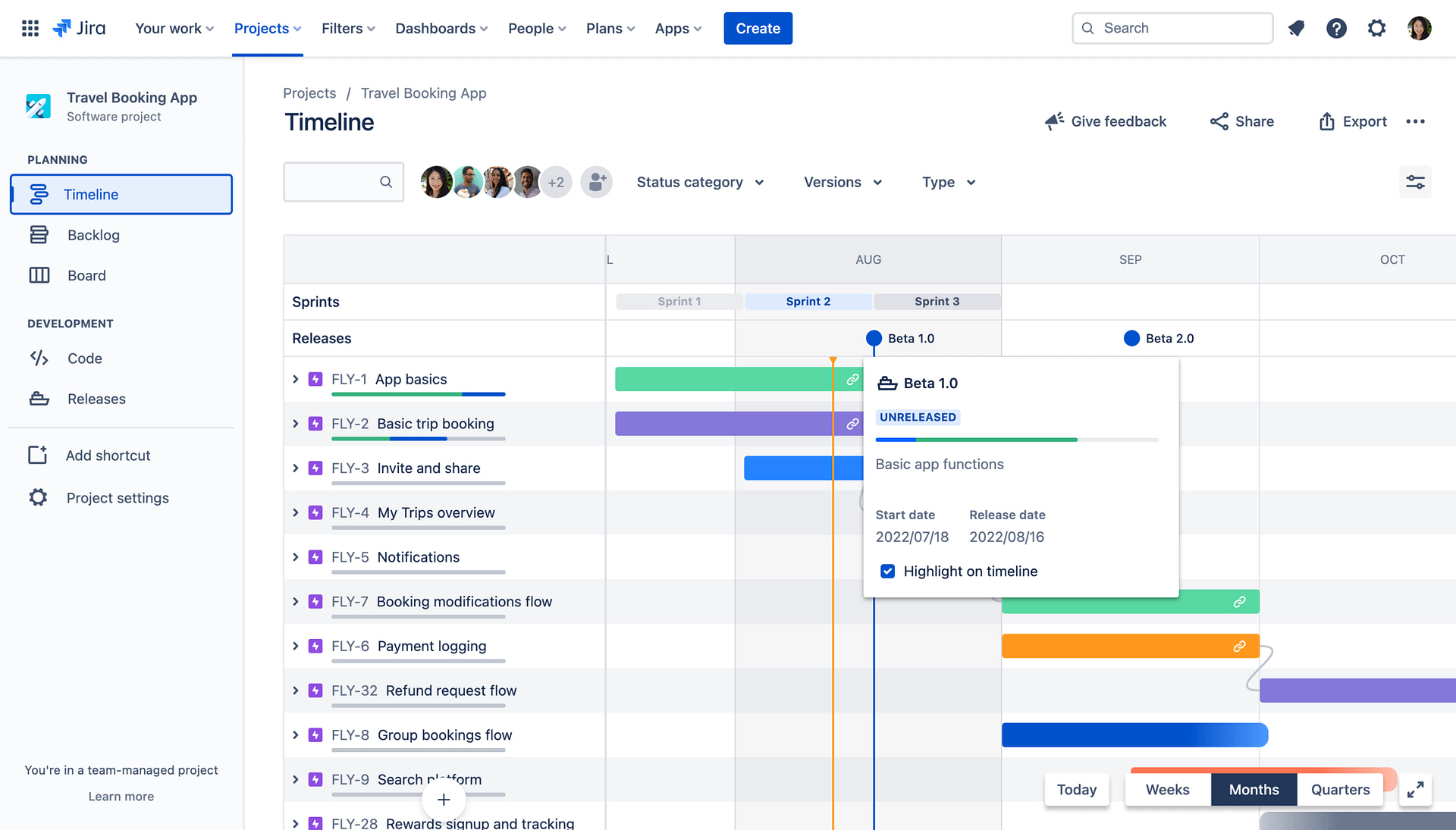
There are a number of built-in reports to help make data-driven decisions about releases, such as the release burndown and version report. You can monitor releases in real time using the Jira timeline view (below). Your Jira Kanban board can be used to visualize the workflow and spot bottlenecks. And if you have a premium subscription, you can use Jira Plans (formerly called Advanced Roadmaps) for visualizing more complex cross-space releases and mapping dependencies.
Jira Deployment Tracking
Finally, Jira release management offers deployment tracking when you integrate your Jira with your CI/CD tool. Once the integration is set up, a new “Releases” section appears in your Jira work items, allowing you to see which environments your ticket has been deployed to.
Where Native Jira Release Management Struggles: Release Execution
Jira’s release management capabilities are strong, but they only go so far. They don’t fully cover the release execution phase: actually delivering the software.
For example, a notable deployment tracking limitation with out-of-the-box Jira is the inability to link Jira versions to deployments. It means you only have visibility of which tickets have been deployed, not which versions, and you don’t get the whole picture in terms of release integrity and what is actually running in each test environment.
However, Jira’s main release management limitation is its lack of test environment management capabilities.
As alluded to earlier, you can co-opt Assets as a test environment inventory and create Assets objects for each environment. But this is a workaround. Assets is a database for IT inventory, not a TEM system. There are no scheduling or booking capabilities, no environment usage calendars or timelines for past and future usage, and no deployment event model to track what was deployed and when.
You can build scheduling capabilities into Jira by using Jira work items as booking requests and adding custom logic to make it run as a booking system. This includes creating appropriate custom fields and automation rules for conflict detection and requesting approval. You can then use this in conjunction with an Assets-based environment inventory.
But even using Assets and Jira-ticket-based booking together is clunky. You have no visibility of timelines, deployments, or dependencies between environments, and the Jira automations you use to flag overlapping reservations and block bookings are brittle and hard to maintain. They’re even harder to keep on top of as the number of environments, teams, and cross-project bookings grows.
So, release managers compensate with other methods and tools.
Spreadsheets, Shared Calendars, and Manual Documentation
Since Jira doesn’t give you a shared, live, environment-centric view, lots of release managers will instead create a spreadsheet, shared calendars, or bits of documentation to track and schedule environments.
The Good, Bad, and Ugly About Spreadsheets for TEM
Spreadsheets allow you to document environment names, statuses, configurations, and availability. Some release managers will even use them to coordinate releases and manage deployment timelines. They do this by creating tabs and custom columns for different environments and manually inputting changes as they happen.
There’s usually someone on all teams who thinks the solution to any problem is a well-designed spreadsheet in Excel, Google Sheets, or SharePoint. But although spreadsheets can work well in planning small releases involving only a few environments, their weaknesses become evident as soon as an operation gets a bit more complicated.
This is because spreadsheets are static. Changes and updates are manual and time-consuming because there’s no automation or integration with CI/CD tools or Jira. The structure of a spreadsheet is so fragile that it’s easy to break all the data. Spreadsheets can’t enforce any rules or responsibilities because anyone can type anything, which can lead to scheduling conflicts and stale reservations. And there’s no real audit trail or accountability because of weak version history and the lack of any usage calendars and timelines.
Returning to the air traffic analogy, spreadsheets are like using a notebook as an air traffic control system.
The Good, Bad, and Ugly about shared Calendars for TEM
Using Outlook or Google shared calendars is an obvious go-to for release managers scheduling test environments.
They’re easy to use and excellent for basic scheduling tasks. However, they fall short when managing a release. Calendars model time slots, not environment states. Like spreadsheets, they can’t enforce rules and don’t offer automation or real-time environment updates because they don’t integrate with Jira or CI/CD pipelines. They lack audit trails and visibility of dependencies and last-minute changes, and basically have no connection to what’s actually happening.
The Good, Bad, and Ugly About Using Emails and Documentation Tools for TEM
Emails are a common way to communicate release plans, but they’re really bad for managing test environments.
For one, they’re slow, which doesn’t work when environments are changing minute by minute. They don’t offer a source of truth because information gets buried in long threads, and not everyone gets cc’ed on everything, which means different people have different contexts. There’s no real-time visibility of the environment state or availability, no automation or integration, and no control.
Using shared, live documentation like Confluence is better than using emails. But not much better. A Confluence page describes what should be happening, not what is happening. Like the other methods we’ve just talked about, it can’t enforce processes or rules and has no concept of an environment’s live state. In this case, you’re literally using a notebook as an air traffic control system.
Dedicated Test Environment Tools
The limitations of spreadsheets, shared calendars, and documentation tools could tempt you to turn to a dedicated TEM tool like Enov8 or Plutora.
These are brilliant tools for release and environment management. But they’re major, completely new platforms you’d need to purchase, install, configure, and integrate with your Jira. Integrating them with Jira can be complex and time-consuming, and may lead to compatibility issues and data inconsistencies. And they come with a completely different user interface, which means investing time and resources to train your team on how to use it.
The other problem with tools like Enov8 or Plutora is that they overlap with a lot of the release management capabilities already available in Jira.
If you’re doing release management in Jira, then to avoid overkill, complexity, and lengthy procurement and onboarding, you’re better off with a Jira app.
Golive: Adding a Missing Layer to Jira
Apwide Golive is a Jira app that adds a test environment management layer to your Jira release management. Here are some of the features it uses to do this.
Jira Test Environment Inventory
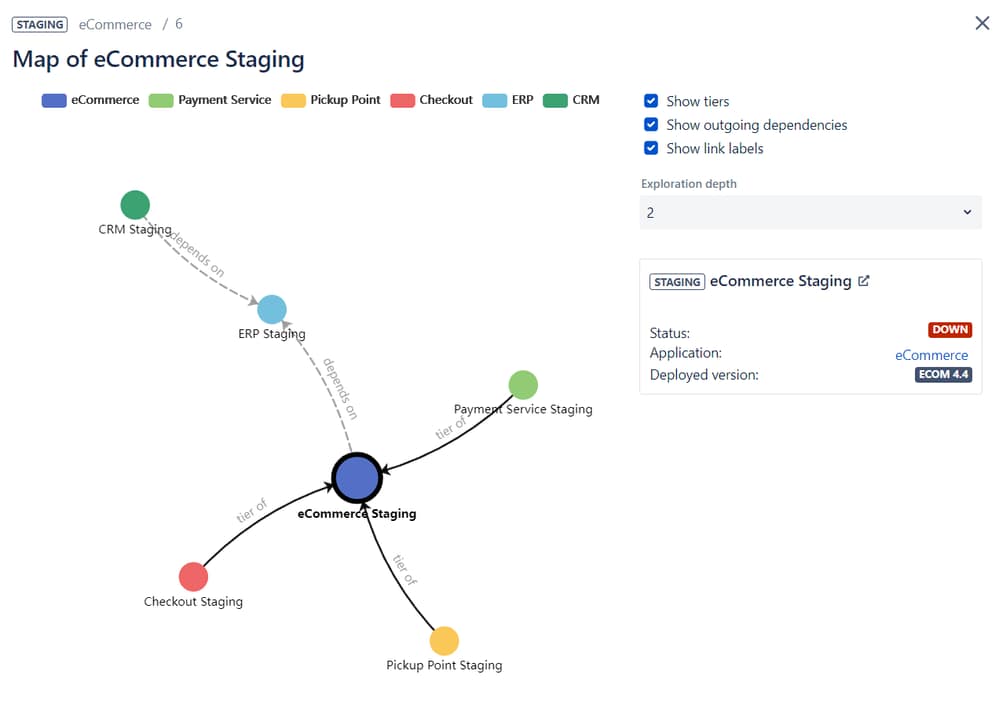
Golive allows you to create a test environment inventory that is purpose-built for TEM and natively integrates with your deployment tools, such as Jenkins and Bamboo. Unlike Assets, where you have to co-opt objects to fit environment concepts and build custom integrations with your CI/CD pipelines, Golive treats environments as first-class objects.
In Golive, each environment has a status, an owner, a currently deployed version, and a full history. You have instant visibility of what is deployed where, right now. You can also track dependencies between environments and key performance indicators (KPIs) such as the percentage availability of an environment over time.
Jira Test Environment Scheduling
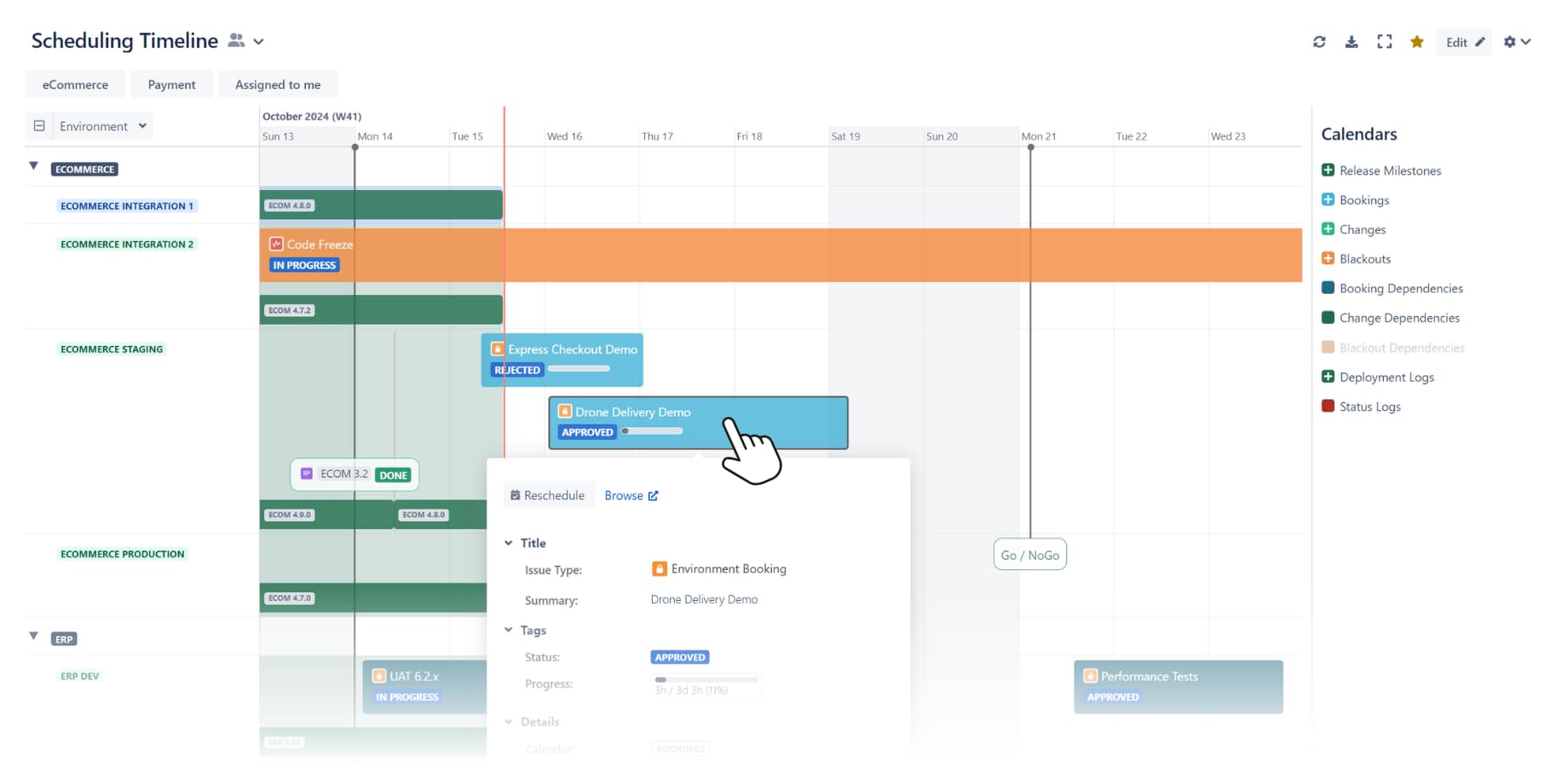
Golive allows you to schedule test environments within Jira with full calendar awareness and real-time visibility of deployments and dependencies. No complicated custom configuration required.
The tool comes with a new Environment custom field for booking requests, connected to your Golive environment inventory. You get automated approvals, dependencies auto-booking, and conflict prevention built-in, so you don’t have to rely on Jira automation.
Golive also offers a visual timeline specifically designed for your booking system, which can be published on a Jira dashboard using Golive’s timeline gadget, or on a Confluence page. Here you can visually check if any bookings are conflicting with other activities scheduled for your environments, and reschedule them with drag-and-drop. This automatically notifies the requesters.
Enhanced Jira Deployment Tracking
Golive enhances out-of-the-box Jira deployment tracking in several ways.
First, Jira only records CI/CD deployments. Golive can record CI/CD deployments, manual deployments, emergency changes, rollbacks, legacy system updates, and vendor releases. And it enhances Jira’s own deployment tracking feature by pushing all this extra deployment data back into Jira.
Second, Golive links Jira versions with deployments. This gives you visibility of which Jira versions have been deployed, not just which tickets, so you can fully assess release integrity and environment state.
Jira Test Environment Self-service
Golive takes some of the heat off the release manager by offering strong self-service capabilities for booking an environment, provisioning it, and deploying a version on it.
Once a user has raised a booking request ticket, the system gives them instant feedback about conflicts, exclusivity rules, or blackout periods. Once a booking is approved, Golive can automatically trigger preparation actions, e.g., resetting the environment, deploying a specific version on it, or refreshing test data via CI/CD.
Coupled with Jira Automation, Golive also offers a test environment self-service desk where users can deploy a specific version on a specific environment themselves, without needing to access a deployment tool. If that environment is already allocated, the user can immediately provision a new one. All from inside Jira.
With Golive, Jira Manages the Plan and the Reality
Golive closes the gap between release planning and deployment execution in Jira.
Without Golive, Jira is good for managing scope, progress, and governance in releases, but environment and deployment management are probably better done elsewhere.
With Golive, Jira is good for all of your release management. From environments and deployments to scheduling and execution readiness, end-to-end software delivery can be done without leaving Jira.
So, if your Jira release management still depends on master spreadsheets, a UAT calendar, or a Confluence page of “current versions”, it’s a sign that your organisation is outgrowing manual, decentralized environment processes. Exactly the problem Golive was designed to solve.
Centralize your Jira release management tasks and try Golive free for one month.